
Start Here / Step 4: Build Your Funnel
Landing Page Wireframe
Translate the copy into a simple mobile-first page structure.
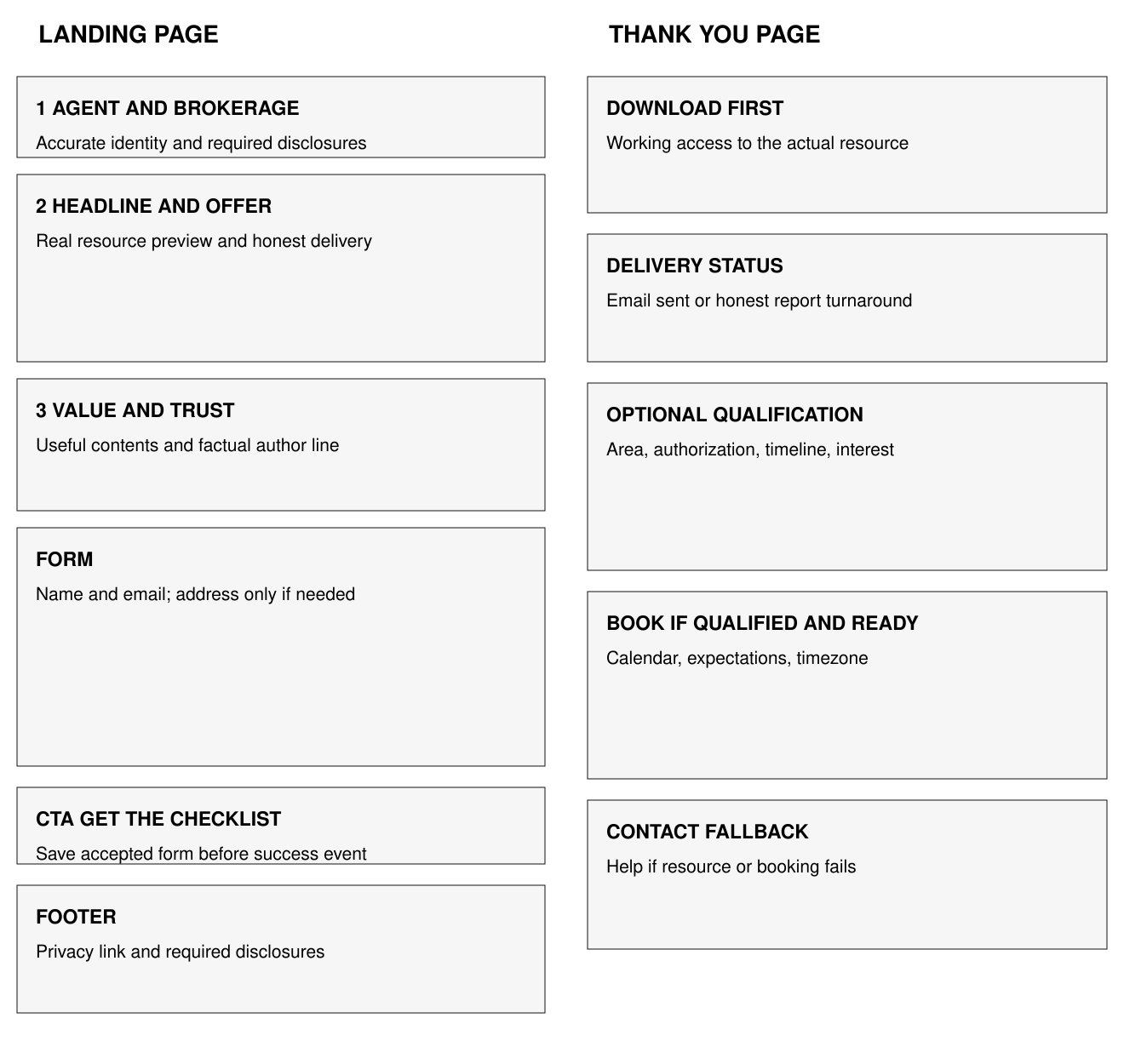
Visual blueprint
The diagram and downloadable PDF show the landing and thank-you pages. The structure works in your current website, CRM funnel builder, or a dedicated page builder. It specifies sections rather than a software interface.
Section 1 Identity: Agent and brokerage identity at the top, with required local disclosures. Avoid a large navigation menu that competes with the resource request. Section 2 Headline and offer: One headline, honest delivery timing, actual resource preview, and a short explanation of what it helps the homeowner decide. Section 3 Value and trust: Three real contents, a factual author line, and a link to the actual privacy notice. Keep unsupported awards or testimonials out. Form: First name and email for a general checklist. Property address only for a property-specific resource. Optional consent controls remain separate and unselected. CTA: Get the checklist. Inline field errors explain what needs correction; preserve entered values after an error. Footer: Required brokerage and licensing disclosures, privacy link, and agent contact.
Thank-you page: Download first; delivery status second; optional qualification and booking third. Include a contact route if the email or download fails.
Mobile construction rules
Use a single readable column and visible field labels rather than placeholder-only labels. Give the submit button enough space to tap. Avoid text overlays on a complex photo. Resize the real preview without blurring body text. Test at approximately 390px viewport width and with enlarged text. These are design test conditions, not regulatory requirements.
Form behavior
Submit must save the lead before displaying success. Show a recoverable error if saving fails. A repeated click should not create duplicate CRM opportunities. The success event fires only after the backend or form provider accepts a valid submission. Provide a contact fallback when the vendor is unavailable.
Build test
Open the page in a private browser window on a phone. Read the headline without scrolling. Complete one valid submission, one invalid email submission, and a second click during submission. Check the real resource, CRM routing, email, privacy link, qualification branch, and calendar path. Record results in CRM Automation and Connection SOP.
You’re done when
The actual page follows the hierarchy, works on mobile, and exposes the download before optional booking.
Support reference R09